Yolo live object detection app by Michael Wen
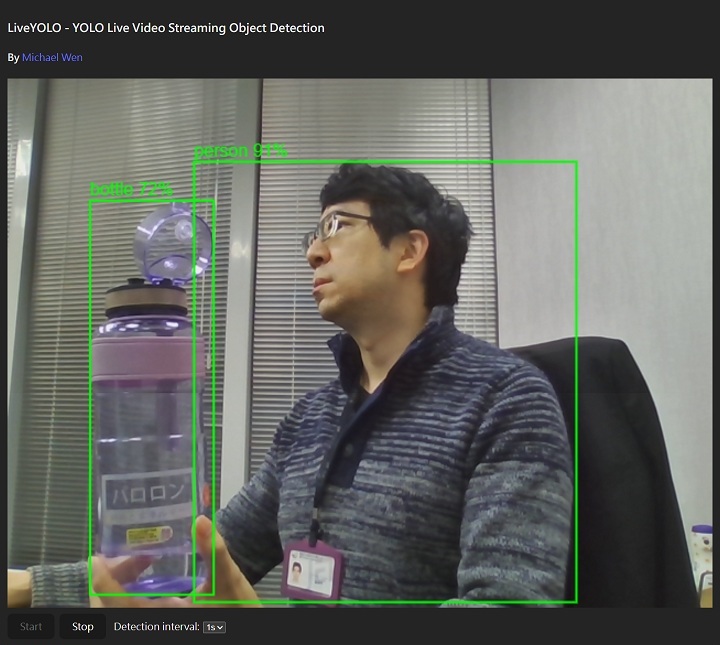
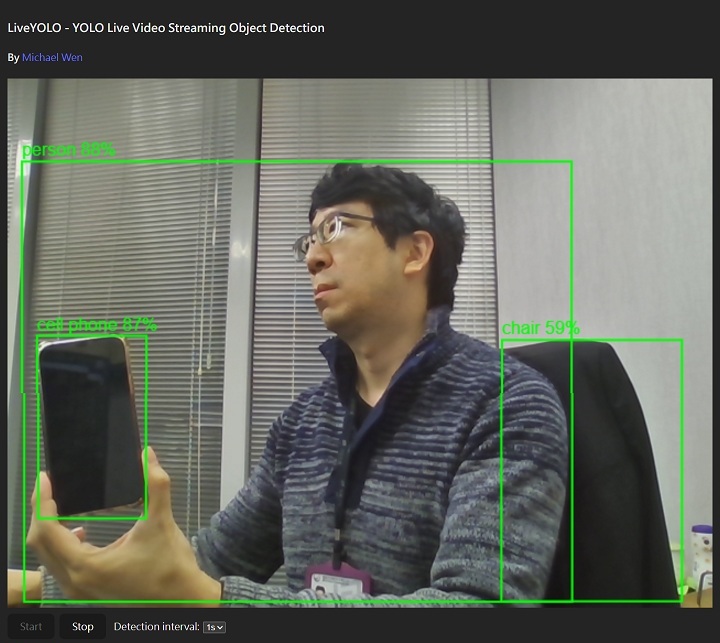
I wrote an app to detect various objects in a live streaming feed here using Yolo, all by myself. Here's the web UI:Here are some screenshots:
Ezoic...............
When I first got streaming to work locally, I assumed exposing it as a public URL would be straightforward. I couldn’t have been more wrong.The real challenge turned out to be getting WebSocket-based streaming to work over HTTPS, due to strict browser security constraints. What initially seemed like a simple deployment task quickly became a deep dive into how browsers, TLS, reverse proxies, and WebSockets actually interact.
I spent a lot of time jumping through hoops—tweaking nginx configs, experimenting with headers, reading specs, and debugging opaque browser errors—until I finally pinpointed the root cause: Ezoic, which I was using as both the nameserver and HTTP proxy. While Ezoic worked fine for normal HTTP traffic, it interfered with WebSocket upgrade headers in subtle ways. Despite multiple attempts, I couldn’t reliably bypass Ezoic for WebSocket traffic on the same domain.
In the end, the solution was to serve the streaming backend from a separate domain that bypasses Ezoic entirely, while keeping the rest of the frontend and REST APIs unchanged. I set up nginx as a reverse proxy for the WebSocket endpoint, learned exactly how the WebSocket handshake works (including the Upgrade and Connection headers), and gained a much deeper understanding of how HTTPS, proxies, and backend servers like FastAPI and Uvicorn fit together.
What I thought would be a small deployment step turned into a crash course in real-world web infrastructure. Frustrating at times—but also pretty cool in hindsight.
What This Project Is About
This project is a real-time object detection web app built around YOLOv8, designed to work even on a low-resource VPS running CentOS 7. The goal was simple on paper: take a live video source (webcam or external camera), stream it to a backend, run object detection continuously, and show the results live in the browser.In practice, almost every layer had constraints — browser security rules, WebSocket quirks, Docker memory limits, HTTPS requirements, and performance bottlenecks — which turned this into a very hands-on systems project rather than “just ML.”
Why I Built It This Way
Instead of doing everything locally, I intentionally deployed this to a VPS with limited disk and memory. This forced careful decisions around:• minimizing memory usage
• avoiding unnecessary frame processing
• keeping Docker images small
• handling real-world browser security restrictions
The result is not just a demo, but a system that mirrors real production constraints.
High-Level Architecture
This app follows a clean separation between frontend and backend, connected by WebSockets.Frontend (Vite + React)
• Runs entirely in the browser
• Captures video using the MediaDevices API
• Displays live video preview
• Sends frames to backend over WebSocket
• Receives detection results asynchronously
• Provides UI controls for detection frequency and stopping detection
Backend (FastAPI + YOLOv8)
• Runs inside Docker on the VPS
• Accepts WebSocket connections
• Decodes image frames
• Runs YOLOv8n inference
• Sends bounding box results back to frontend
Nginx (Reverse Proxy)
• Serves frontend over HTTPS
• Terminates TLS
• Proxies secure WebSocket (wss://) to FastAPI
• Keeps long-lived WebSocket connections alive
Vertical Architecture Flow
User’s Browser⬇
Camera → MediaDevices API
⬇
React UI (Vite build)
⬇
WebSocket (wss://)
⬇
Nginx (HTTPS termination)
⬇
FastAPI WebSocket endpoint
⬇
YOLOv8n model inference
⬇
Detection results (JSON)
⬇
React renders boxes + labels
Everything flows vertically and asynchronously, which keeps the UI responsive even when inference is slow.
Biggest Challenges Faced
1. Browser Security (HTTPS + WSS)Modern browsers will not allow camera access or WebSockets unless the page is served securely. Initially, this completely broke `getUserMedia()` and WebSocket connections.
Fix:
• Set up HTTPS using Let’s Encrypt
• Terminated TLS at Nginx
• Switched all WebSocket connections to `wss://`
• Ensured frontend never uses `ws://` on HTTPS pages
This alone solved multiple “mysterious” browser errors.
WebSocket Proxy Issues
Even after HTTPS worked, WebSockets kept failing silently.Root cause:
Nginx requires very specific headers for WebSocket upgrades. Even small mistakes (like lowercase `upgrade`) break everything.
Fix:
• Explicit `proxy_http_version 1.1`
• `Upgrade` and `Connection Upgrade` headers
• Disabled buffering
• Increased read timeout to support long streams
Once this was fixed, WebSockets became stable.
Performance and Choppy Video
Running YOLO on every frame was unrealistic on a low-end VPS. It caused:• High CPU usage
• Low FPS
• WebSocket congestion
• Laggy UI
Fix:
Instead of detecting every frame, detection runs on a fixed interval:
• 1 second (default)
• 2 seconds
• 5 seconds
Video streaming remains smooth, while detection runs independently. This separation dramatically improves perceived performance without increasing resource usage.
Memory Management Concerns
Streaming images continuously raises questions about memory leaks.Key insight:
Python automatically releases memory for temporary objects once they go out of scope. Variables like:
• decoded image bytes
• NumPy arrays
• OpenCV frames
are eligible for garbage collection after each loop iteration.
As long as references are not stored globally, memory usage remains stable.
Docker Constraints and Design
Running everything inside Docker added another layer of complexity.Decisions made:
• Use `python:3.11-slim` to reduce image size
• Multi-stage builds to avoid shipping build tools
• Reuse a single FastAPI app instead of multiple containers
• Import new endpoints as separate modules instead of duplicating apps
This keeps disk usage and RAM consumption under control.
Frontend UI Design Choices
The UI intentionally stays minimal but functional.Features:
• Camera selection
• Start / Stop detection button
• Detection interval selector (1s / 2s / 5s)
• Rolling status log showing system events
• About section explaining architecture and challenges
Everything is optimized for mobile viewing and slow networks.
Why YOLOv8n
YOLOv8n was chosen because:• Small model size
• Fast inference compared to larger variants
• Acceptable accuracy for live streaming
• Works well on CPU-only servers
On a constrained VPS, this is the best balance between speed and usefulness.
What This Project Demonstrates
This project isn’t just about object detection.It demonstrates:
• real-time streaming system design
• WebSocket-based ML pipelines
• browser security compliance
• production-style deployment
• performance optimization under constraints
It’s the kind of project where the hardest parts aren’t the ML — they’re everything around it.
Final Thoughts
Building this forced me to think like a backend engineer, frontend engineer, DevOps engineer, and ML engineer at the same time.Most problems were not obvious at first, but each fix improved the system’s stability and clarity.
In the end, this became a solid example of how to run real-time computer vision on real infrastructure, not just in a notebook or local demo.
Any comments? Feel free to participate below in the Facebook comment section.